Technology [INTRO] Stereo and Multiview — what is the difference?
페이지 정보

작성자 MOPIC
작성일2026.09.30
작성일2026.09.30
본문
MOPIC 3D · Background Essentials
Stereo and Multiview — what is the difference?
Q
How do the Stereo and Multiview approaches to glasses-free 3D differ?

A
First, how does glasses-free 3D work?
A glasses-free 3D display uses an optical lens to deliver a different image to the left eye and to the right eye. The brain reads the viewpoint difference between the two images as depth, so you perceive 3D without a VR headset.
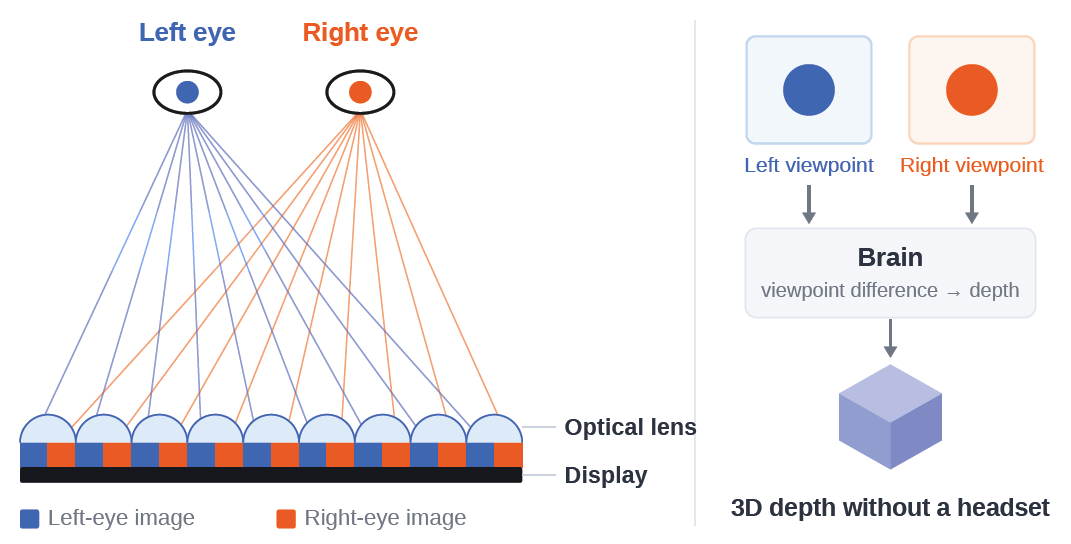
Stereo and Multiview both rely on this principle, but they differ in how the images are presented.
· Stereo — tracks the position of one user and shows the images matched to that person.
· Multiview — does not track the user, and shows images from multiple viewpoints at the same time.
At a glance
| Item | Stereo | Multiview |
|---|---|---|
| Basic approach | Matched to one user's position | Multiple viewpoints shown at once |
| Eye Tracking | Used | Not used |
| View configuration | Left / right, 2 Views | Multiple Views |
| When the user moves | The image follows the user's position | A different View appears at the new position |
| Number of viewers | One user (tracking-based) | No limit from tracking |
| 3D resolution | Relatively high | Lower than Stereo |
| Main use cases | Personal use, medical, design & inspection | Exhibitions, signage, group viewing |
01Stereo — 3D matched to the user's position
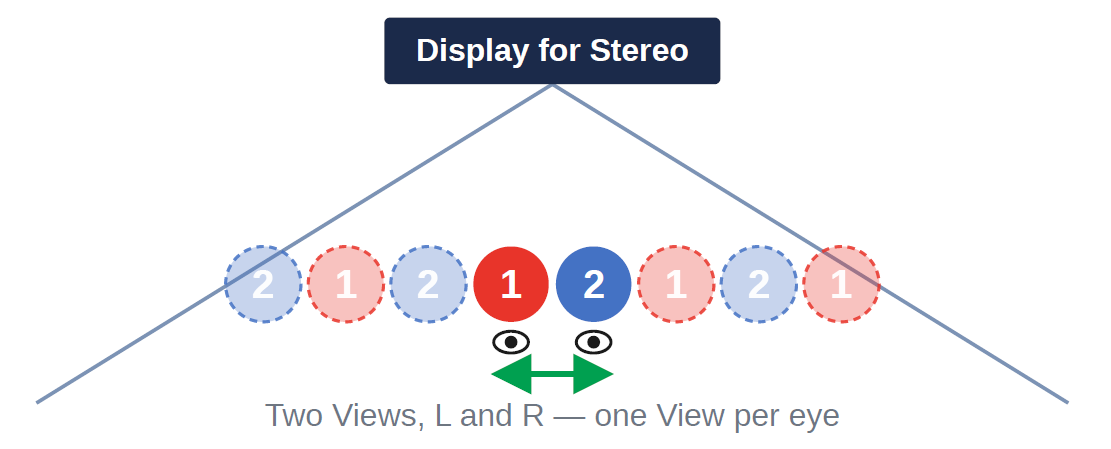
In Stereo, a camera tracks one user's eye position in real time.
It shows two Views — one for the left eye and one for the right eye — matched to the user's current position, so the 3D image adjusts as the user moves.
02Multiview — 3D viewpoints laid out across space in advance
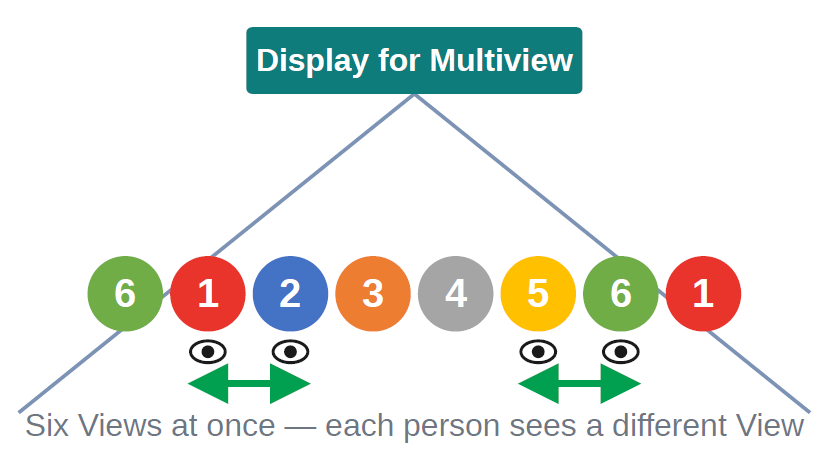
Multiview does not use Eye Tracking. Instead, it renders one scene as several images from different viewpoints and displays them all at once.
With 6 Views, for example, the display shows six images of the same object seen from six different positions, and as the user moves left or right they naturally see a different View.
In other words, the system does not follow the person — the person's position determines which 3D viewpoint they see.
In short
Stereo = the 3D image follows the person
Multiview = many 3D viewpoints laid out across space in advance
Multiview = many 3D viewpoints laid out across space in advance
Frequently asked questions
Q
If a Multiview monitor plays 6 View content, can only six people watch it?
No. The number of Views and the number of viewers are different concepts.
6 View means the display shows six images from six different viewpoints. Each View repeats in a regular pattern across the space in front of the screen, and each person sees the View that belongs to the position where 3D looks best to them.
So adding more people does not generate additional images, and the number of viewers does not lower 3D resolution.

Q
Is a higher View count always better?
Not necessarily.
The more Views there are, the finer and smoother the viewpoint change as the user moves. But the same panel now has to present more Views, so 3D resolution drops.
For Multiview, therefore, it matters to choose a View count that balances smooth viewpoint change against 3D resolution.

Key point
The View count is not “how many people are watching” — it is “how finely the viewpoint changes.”
Q
Why is Multiview lower in resolution than Stereo?
Not because there are more people, but because one display has to present more Views at the same time.
Stereo uses 2 Views, left and right, while Multiview shows six or more Views at once. On the same panel, the more Views there are, the less screen information each View can use, so 3D resolution goes down.
With 6 View Multiview, 3D resolution appears to be about 1/3 that of Stereo.

XResolution drops because more people are watching
OResolution drops because there are more Views
Q
Why does viewing distance matter?
A 3D lens is designed around a target viewing distance, which sets the spacing between Views and the number of Views.
Stereo uses 2 Views, designed so that at the viewing distance the gap between the two Views is about 65 mm — roughly the distance between a person's eyes.
Multiview lays out many Views, designed so that the gap between adjacent Views never exceeds 65 mm, which is what lets each eye see a different image.
The farther the viewing distance, therefore, the more Views are required.

Example — the current 32-inch product
The current MOPIC 32-inch Chooyu (Stereo type) is designed to look best at about 83 cm.
Multiview content can be played on this product, but to see it properly you would have to watch from at least 249 cm — roughly three times the Stereo distance. Viewing a 32-inch screen from about 2.5 m is impractical in real use, so we do not recommend demonstrating Multiview on the current 32-inch Stereo product.