Case Studies [Medical / Microscope ] Seoul National University Hospital Smart Simulation Center
페이지 정보

작성자 MOPIC
작성일2026.10.21
작성일2026.10.21
본문
Case Study · Medical / Inspection microscope
Seoul National University Hospital: Dhaula 15.6″ for Inspection Microscope Imaging
Inspection microscope images in 3D, without the eyepieces
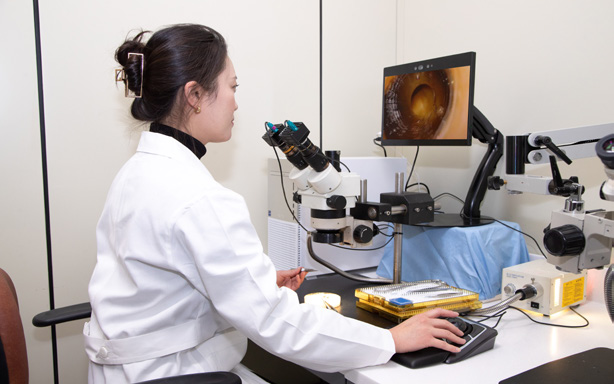
Seoul National University Bundang Hospital's Simulation Center has introduced the Dhaula 15.6″ glasses-free 3D display in its reading room and is piloting an environment in which the stereoscopic image of an inspection microscope is viewed on a display instead of through the eyepieces. A camera on each eyepiece captures what the left and right eye would see, and the video passes through a PC to the Dhaula 15.6″, which shows it in 3D.
At a glance
| Customer | Seoul National University Bundang Hospital — Simulation Center |
| Industry | Medical / inspection microscopy / image reading |
| Viewing environment | Reading room — observation on a display instead of the eyepieces, one viewer at their own display |
| Display | Dhaula 15.6″ glasses-free 3D display (4K UHD, VESA mount) |
| Image capture | A microscope camera solution from a MOPIC customer — a camera on each of the left and right eyepieces, capturing in place of the two eyes |
| Integration | Left/right camera video into the PC as SBS → converted to glasses-free 3D in MOPIC Hub → shown on the Dhaula 15.6″ — no software development |
| Project stage | Introduced · pilot operation |
| Key results | Stereoscopic observation of the inspection microscope image with the head up, no eyepieces · connected to the existing camera solution without software development · the same setup extends to other reading rooms and microscopes |
1
Background and challenge
An inspection microscope is used by putting both eyes to the eyepieces. When reading the fine structure of a specimen, depth — how high a surface rises, which layer a structure sits in — matters, so a microscope capable of stereoscopic observation sends a slightly different view to each eyepiece. Getting that depth means holding your eyes fixed to the eyepieces. Head bent, neck and shoulders locked for long periods, the posture builds up fatigue and tension, and the field of view is confined to the eyepieces, making it hard to look at anything else.
Capturing the microscope image with a camera and sending it to a flat monitor lets you look up and sit comfortably, but the depth you saw through the eyepieces is gone. When you need to check which layer a structure is in or how far a surface rises, you end up going back to the eyepieces. The reader's choice was either the depth of the eyepieces or the comfortable posture of a monitor.
A glasses-free 3D display delivers both at once. Capture the two viewpoints the left and right eyepieces provide with one camera each, send them to the display's left- and right-eye images as they are, and you see the same depth without putting your eyes to the eyepieces. There is one more condition: no new software to build. To keep adoption easy, it should be enough to take the video from an existing microscope camera solution and display it.
2
How it was applied
Seoul National University Bundang Hospital's Simulation Center introduced the Dhaula 15.6″ glasses-free 3D display in its reading room and is piloting it. The video goes through three stages: cameras on the eyepieces capture the left and right images, a PC turns them into glasses-free 3D, and the Dhaula 15.6″ shows them stereoscopically.
Microscope side — the microscope and eyepiece cameras
The inspection microscope in use and a microscope camera solution mounted on each of the left and right eyepieces. The camera solution is a product made by a MOPIC customer: two cameras, in the positions of the left and right eye, capture exactly what the eyepieces show, and send the left and right images to the PC in SBS format (the left- and right-eye images side by side in one frame).
Added components — what MOPIC added
MOPIC supplied the Dhaula 15.6″ glasses-free 3D display for microscope image reading: a 4K UHD display with optics designed for close viewing at a desk, supporting VESA mounting so it can be installed to suit the reading room.
· 3D optical design for the reading distance, 4K UHD resolution
· VESA mount support — installed on the reading desk or an arm
· The close-range personal model in the 15.6″ · 32″ · 65″ lineup built on the same glasses-free 3D technology
Integration — how they were connected
A PC running MOPIC Hub connects the camera solution and the display. Hub on the PC takes the SBS video coming from the cameras and converts it in real time into glasses-free 3D for the Dhaula 15.6″. No SDK development or hospital software changes are needed: connect the camera output to the PC, install Hub and the display, and the setup is complete.
How it fits together
Inspection microscope Two viewpoints through the left and right eyepieces | → | Eyepiece cameras Left/right cameras capture the two eyes' viewpoints · output as SBS | → | PC · MOPIC Hub SBS video converted to glasses-free 3D in real time | → | Dhaula 15.6″ Optics for the reading distance · 4K UHD | → | Viewer Stereoscopic observation with the head up, no eyepieces |
Hospital side Provided by MOPIC
A camera goes on each eyepiece because depth comes from the difference between two viewpoints. The microscope already sends slightly different images to the left and right eyepieces, and we perceive depth from that difference. The two cameras capture those two images in place of the left and right eye, and the glasses-free 3D display sends them back to the left and right eye, so the depth seen through the eyepieces is reproduced on the display.
Not using the eyepieces means a different viewing posture. The Dhaula 15.6″ can be set at eye level with a VESA mount, so instead of bending to bring your eyes to the eyepieces, you look at the screen sitting at the desk as you are. Because your eyes are away from the screen, shifting your gaze to notes or another monitor during reading is natural. The 15.6-inch size was chosen for exactly this close-range reading position.
The setup also divides roles cleanly. Capture is handled by a MOPIC customer's microscope camera solution; display by MOPIC's Hub and display. A hospital uses equipment rather than building it, so unlike Solectrix, which integrated the Native 3D SDK into its own viewer, it only needs to connect the camera output to Hub. Observation video recorded in SBS can also be reviewed in 3D on the same display.
3
Results and value
| Item | Before | After (glasses-free 3D) |
|---|---|---|
| Viewing posture | Eyes fixed to the eyepieces — head bent, neck and shoulders locked | Looking at the display with the head up — free posture |
| Depth | Only through the eyepieces / flat on a monitor | Left/right camera images shown in 3D on the display |
| Field of view | Confined to the eyepieces — looking at notes or another screen means lifting your eyes away | Viewing from a distance, so shifting gaze during reading is natural |
| Software | Custom viewer development or dedicated equipment | MOPIC Hub installed on a PC — no development |
| Microscope side | — | Camera solution mounted on the eyepieces · left/right video into the PC as SBS |
Inspection microscope images without eyepieces
In the reading room, the microscope image can now be observed in 3D without putting your eyes to the eyepieces. The depth of fine structures can be checked in a comfortable, head-up posture, free of the fatigue and restricted view that come with holding your eyes to the eyepieces.
Connected to the existing camera solution without development
Because MOPIC Hub takes the camera solution's SBS video as it is and converts it, the hospital connected the existing microscope camera to a glasses-free 3D display without developing any software.
The same setup can be extended
A simple setup — camera solution, PC with Hub, and display — means the same configuration can be added to other reading rooms or microscopes depending on the results of the pilot.
Consider this approach if…
Not limited to inspection microscopes. Any equipment observed stereoscopically through eyepieces can get an eyepiece-free viewing environment with the same setup.
Where it applies
· Hospitals, labs and inspection sites using equipment where operators hold their eyes to the eyepieces for long sessions — inspection, stereo and surgical microscopes
· Microscopes from which left and right viewpoints can be captured with eyepiece cameras or a stereo camera
· You use the equipment rather than build it, so it must work without SDK development
· A position where one person views at close range — a reading desk or beside the microscope, where the 15.6″ close-range optics fit
· You want to validate with a pilot before full adoption — connect a PC, Hub and display to the camera output and it is ready
Terms used in this article
· Eyepiece — the lens you look into on a microscope; the left and right eyepieces show slightly different views, and getting depth means holding both eyes to them
· Microscope camera solution — cameras mounted on the left and right eyepieces that capture what each eye would see; in this case a product from a MOPIC customer
· MOPIC Hub — MOPIC's playback software installed on a PC; converts SBS stereoscopic or 2D video in real time for a glasses-free 3D display, with no SDK development
· Dhaula 15.6″ — the 15.6-inch model in MOPIC's glasses-free 3D display lineup; 4K UHD, VESA mount, for close-range personal viewing
· Native 3D SDK — the developer kit equipment makers use to integrate 3D display into their own software; a separate product from Hub
Related case studies
[Medical / Education] Seoul National University Hospital Smart Simulation Center →
Another application at the same hospital — 3D endoscope video streamed live to a training room outside the OR
[Industrial / Microscope] Solectrix →
A microscope maker integrated the Native 3D SDK into its own software — the contrasting path to Hub
Related products
Learn more
Glasses-free 3D: essential background →
Lenses, viewing distance, viewpoint tracking — the basics of glasses-free 3D
Glasses-free 3D glossary →
Optical design · cameras · 3D content formats · software acronyms
Contact
If you are considering moving eyepiece-based equipment such as microscopes to display-based observation, tell us about the microscope and camera configuration (eyepiece cameras, stereo camera), the installation location and the viewing distance. We will help you work out the right display configuration and how to connect MOPIC Hub.