Case Studies [Automotive / Infotainment] Mobase
페이지 정보

작성자 MOPIC
작성일2026.03.09
작성일2026.03.09
본문
Case Study · Automotive / Infotainment
Mobase: A Glasses-Free 3D Display in an In-Vehicle Infotainment System
Depth added to an existing 2D infotainment UI
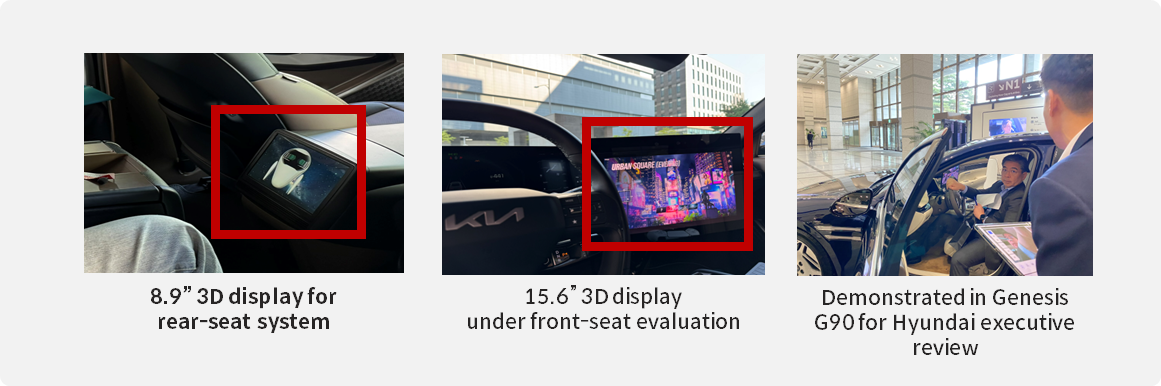
Mobase added glasses-free 3D depth on top of its existing Unity-built 2D infotainment UI. An 8.9-inch in-vehicle glasses-free 3D display and the Unity-based 3D SDK turned maps, menus and media into a stereoscopic in-car digital experience.
At a glance
| Customer | Mobase (Korea) |
| Industry | Automotive / in-vehicle infotainment / HMI systems |
| Viewing environment | Vehicle cabin — driver and passengers in fixed seating positions |
| Display | 8.9" in-vehicle glasses-free 3D display (optics designed for the seating position) |
| Key technology | Eye-tracking-based 3D rendering · 3D maps · depth-based UI animation · stereoscopic media playback |
| Integration | Unity-based 3D SDK — 3D added on top of the existing 2D UI system |
| Project stage | Applied to the in-vehicle infotainment system |
| Key results | 3D UI/UX implemented in the infotainment system · maps, menus and media visualized stereoscopically · a more immersive digital experience for occupants |
1
Background and challenge
Inside the vehicle, demand is rising fast for immersive UX/UI experiences that go beyond simply displaying information. Infotainment systems based on flat (2D) displays, however, offer limited visual depth and make it hard to build a differentiated interface. Automakers are therefore increasingly interested in 3D UI technology for vehicle displays.
Much infotainment UI is already built in 3D: maps draw buildings and terrain in three dimensions, and menu transitions use animation with perspective. On a flat display, though, all that depth is only suggested by shadows and perspective effects — the viewer feels no real depth. If the display can show real depth, today's 3D assets come to life without rebuilding the UI.
A vehicle cabin is a favorable setting for glasses-free 3D: occupants sit in known positions, so viewing position and distance are known at the design stage and stereoscopic quality can be tuned precisely. Mobase used this to implement a 3D interface while keeping its existing UI assets.
2
How it was applied
Mobase applied MOPIC's glasses-free 3D display module and 3D SDK to its in-vehicle infotainment system. The existing Unity-based UI stays as it is; the display and SDK extend it into a 3D interface.
Existing assets — what the customer already had
The Unity-built 2D infotainment UI system — navigation, menu and media screens and the 3D graphic assets inside them. The UI structure and development environment stay unchanged.
Added components — what MOPIC added
MOPIC developed an 8.9-inch in-vehicle glasses-free 3D display for the cabin environment, with optics designed around the seating position and eye-tracking-based 3D rendering that aligns the stereoscopic image to the occupant's eye position.
· 3D optical design based on the occupant's seating position
· Eye-tracking-based 3D rendering aligned to the occupant's viewpoint
· A 3D interface suited to navigation, infotainment functions and media content
Integration — how they were connected
MOPIC's Unity-based 3D SDK made it possible to add 3D on top of the existing 2D UI system: 3D map display, depth-based UI animation and stereoscopic media playback, with real-time interaction and an immersive UI built in the Unity development environment. The UI team keeps working in the Unity project it already uses.
How it fits together
Unity 2D infotainment UI Navigation · menu · media screens and 3D graphic assets | → | Unity 3D SDK 3D added on top of the existing UI · real-time interaction | → | 8.9" in-vehicle 3D display Optics for the seating position · eye-tracking | → | Driver and passengers Maps, menus and media with depth, no glasses |
Customer-owned Provided by MOPIC
Using the Unity 3D SDK means the way the UI is developed does not change. The SDK renders the camera in the Unity scene from two viewpoints and outputs it for the display, so the 3D maps and menu animations already built gain real depth. Deciding which elements come forward and which sit back is done the way it always is in Unity — by positioning objects.
Eye-tracking raises stereoscopic quality in an environment like a vehicle where the viewing position is fixed. A camera tracks the occupant's eye position and aligns the stereoscopic image to it, so leaning or shifting posture does not break the 3D effect.
Watch the video
Watch the video
3
Results and value
| Item | Before | After (glasses-free 3D) |
|---|---|---|
| Depth in the UI | Suggested by shadows and perspective | 3D maps, menus and media with real depth |
| UI development | Unity 2D UI | Same Unity project + 3D SDK — assets reused |
| Occupant equipment | — | None — eye-tracking aligns the viewpoint |
| Service expansion | 2D content | 3D maps and stereoscopic content as a base for new services and subscription models |
A better infotainment experience
With a 3D interface, occupants enjoy a more intuitive and immersive infotainment experience.
Premium in-car UX differentiation
3D UI/UX differentiates the in-car digital experience and strengthens the premium brand image.
Room for new services
The 3D map and content-based interface lays a foundation for expanding into new services and subscription content models.
Customer interview
“
An in-vehicle infotainment system is a key factor that decides the user experience, beyond simply displaying information. With MOPIC's glasses-free 3D display and SDK we extended our existing UI system into a far more immersive interface.
— from the Mobase interview
Consider this approach if…
Beyond in-vehicle infotainment, any UI or content built in Unity can gain a 3D interface the same way.
Where it applies
· You already have a UI, kiosk or content built in Unity that uses 3D assets
· A fixed viewing position — driver's seat, operator's seat, in front of a kiosk — where eye-tracking lifts stereoscopic quality
· You need a differentiated experience while keeping existing UI assets and the development environment
· You plan to expand into new services or subscription models built on 3D maps or stereoscopic content
Terms used in this article
· Unity 3D SDK — MOPIC's developer kit that renders a Unity scene from left and right viewpoints and outputs it to a glasses-free 3D display
· Eye-tracking — a camera tracks the viewer's eye position and aligns the stereoscopic image to it; suited to fixed viewing positions
· HMI (human-machine interface) — the screens and controls through which people and the vehicle's systems exchange information
· Glasses-free 3D display — a display whose lens layer sends different images to the left and right eye, showing depth without glasses
Related case studies
[Automotive / HMI] Renault →
Same vehicle environment — a 9.2" display and the Native 3D SDK turn the rear camera feed into 3D
[Exhibition / Promotion] Lotte Metaverse Exhibition Booth →
Existing 3D content made into glasses-free 3D interactive content with the 3D SDK
Related products
Learn more
Glasses-free 3D: essential background →
Lenses, viewing distance, viewpoint tracking — the basics of glasses-free 3D
Glasses-free 3D glossary →
Optical design · cameras · 3D content formats · software acronyms
Contact
If you are considering glasses-free 3D for a vehicle display or a Unity-based UI, tell us the display size, the seating (viewing) position and your current UI development environment. We will help you work out the display configuration and the scope of Unity 3D SDK integration.